









ServicesPlatform refresh
Make it feel new.New look, same data.
We modernize tired apps, sites and platforms and keep the data, links and users you already have. This site is our latest refresh.
Email admin@mastersoftware.io. A team member will respond within 24 hours.
Is it time?
Signs your softwareneeds a refresh.
If one of these sounds familiar, a refresh can fix it without starting from scratch.
- 01
Slow pages
People wait for screens to load, and some leave before they do.
- 02
Hard to update
Changing a price or a photo means calling a developer, if anyone still knows how.
- 03
Looks dated on phones
Tiny text, buttons too small to tap and layouts that break on a small screen.
- 04
Bugs nobody can fix
The person who wrote the code is gone, and every fix breaks something else.
- 05
Can't add features
New ideas stall because the old code can't carry them.
What we refresh
Anything that's showing its age.
Refresh one piece or the whole product. Each change is planned so the parts that work keep working.
A new UI and design system
A modern look plus a kit of reusable parts, so every screen you add later matches.
Codebase modernization
Old frameworks replaced with current ones like Next.js, SwiftUI and Kotlin that the next developer will know.
Speed and performance
Faster pages and screens, smaller downloads and quicker database queries.
Database migration without data loss
Every record moves to a modern database, and we check the counts match before the switch.
Security hardening
Updated dependencies, safer sign-in and access rules on every table.
Accessibility
Readable contrast, keyboard support and labels for screen readers.
Mobile app rewrites
Aging apps rebuilt in SwiftUI, Kotlin or React Native, with users and their data kept.
Moving hosting
From an old server to modern hosting like Vercel and Supabase, with every file and setting carried over.
AI features
Search, summaries, assistants and automations added to the product you already have.
Analytics
See which pages and features people use, so the next change starts from real numbers.
Case study
This site,before and after.
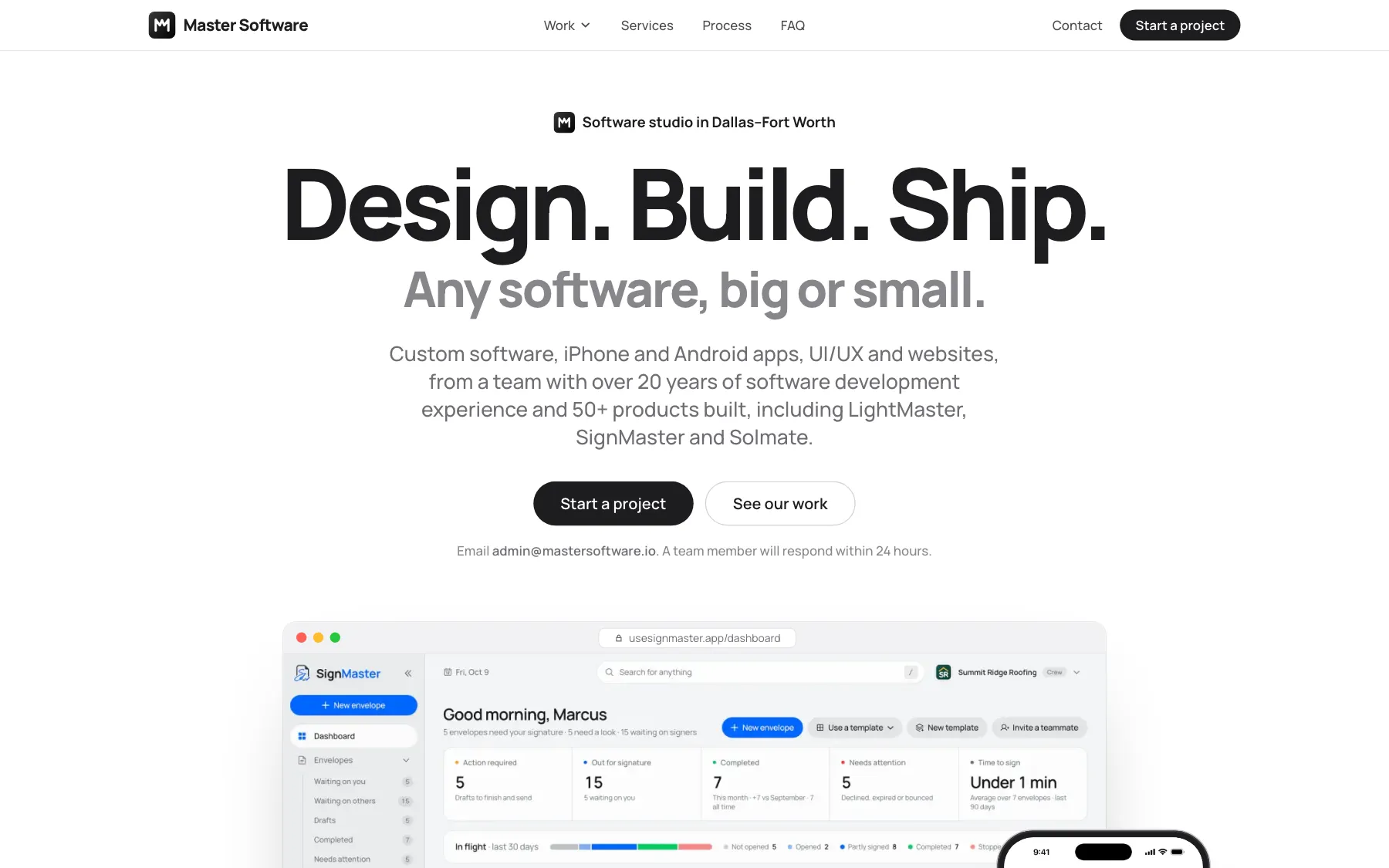
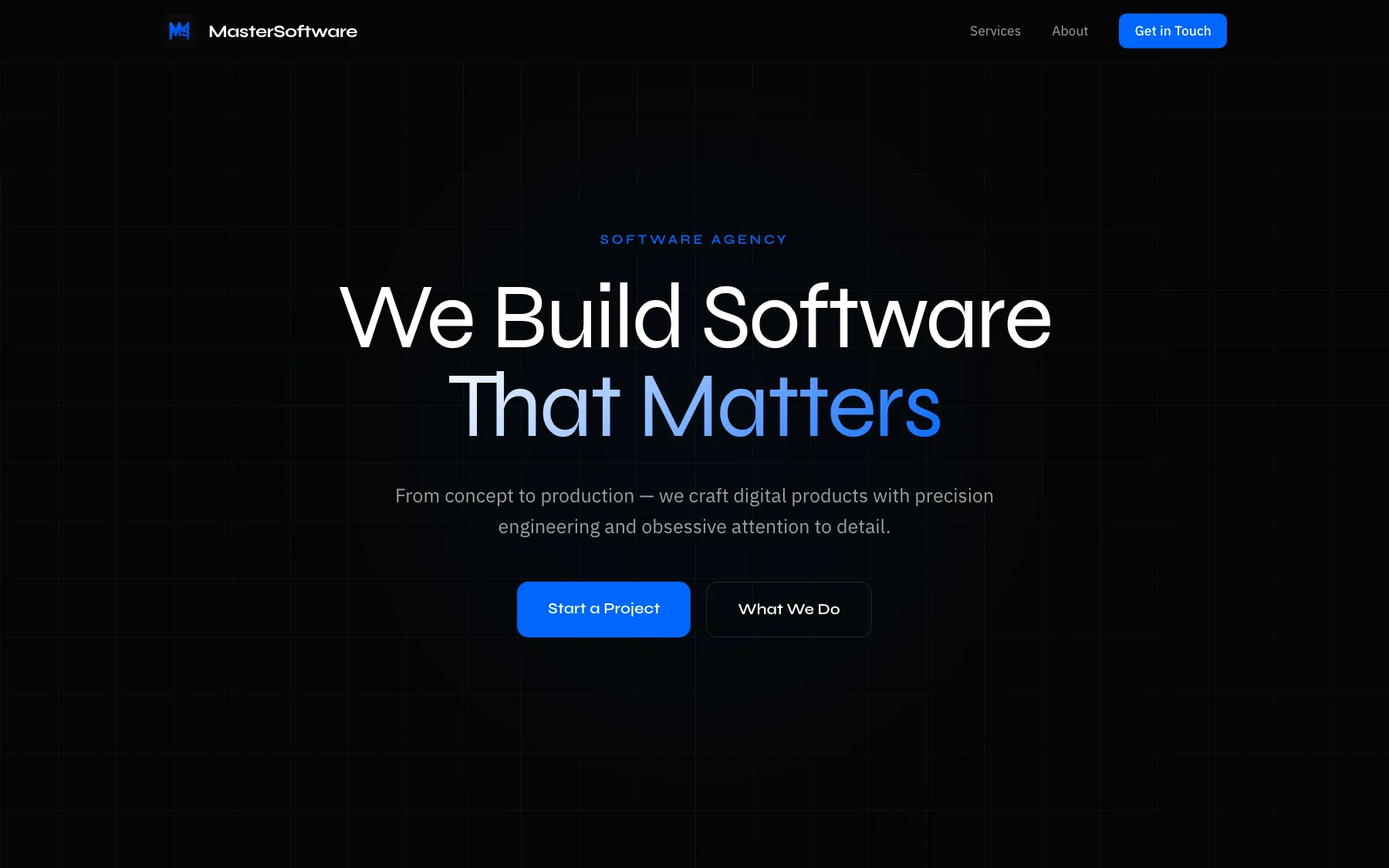
We refreshed mastersoftware.io itself. Same company and same email, with a new look and our real products up front.
Before
After
Look
Black, with blue accents
White, with black ink
Typefaces
Syne and IBM Plex Sans
Manrope
Buttons
Blue rounded rectangles
Black pills
First screen
A slogan and two buttons
Real product screens on a computer, iPad and iPhone
Screenshots of the mastersoftware.io home page before and after its 2026 refresh.
Keep what works.Change what doesn't.
Before we touch anything, your written plan lists both. Here's a typical split.
What stays
The things your customers count on.
- Your data and its history
- Your domain and your links
- Your users and their logins
- Your content and photos
- The features people use every day
What changes
The things holding you back.
- How it looks on every screen
- How fast it loads
- How easy it is to update
- The code underneath
- What you can add next
How it works
How a refresh runs.
Six steps. Your current version stays live until the new one is ready.
- 01
Audit
We review the code, data, speed and design, and list what's urgent.
- 02
Plan
A written plan of what stays, what changes, the timeline and the price.
- 03
Redesign
New screens you click through and approve before we build.
- 04
Rebuild in stages
We rebuild behind the scenes while today's version stays live.
- 05
Switch over
Traffic and data move to the new version without downtime.
- 06
Measure
We compare speed and use before and after, then tune.
Questions? Answers.
Will we lose data or search rankings?
We plan around both. Data moves with record counts checked before and after the switch, and every old link either keeps working or redirects to its new page, with page titles and descriptions carried over.
Can you work with my existing developer?
Yes. We can work alongside them, review their code before we start, or take the project over completely. You decide, and the plan says who does what.
Can you refresh only the design?
Yes. We can redesign the screens and build a new design system on top of your current code, or hand the designs to your own team to build.
How long does a refresh take?
A website refresh can take a few weeks. A full platform or app rewrite takes months. The audit ends with a written plan that has the timeline and the price before any work starts.
Will our users notice downtime?
They shouldn't. We build the new version next to the live one, test it with real data, and switch over at a quiet hour with a way back if anything looks wrong.
Let's make it new.
Send us a link to what you have today. A team member will respond within 24 hours.