









ServicesAI features
Put AI to work.Chatbots, agents and tools built into your product.
We build AI features people use every day, from a chat that answers your customers to an assistant that fills out contracts. We shipped them in our own products first, and we'll build the right ones into yours.
Email admin@mastersoftware.io. A team member will respond within 24 hours.
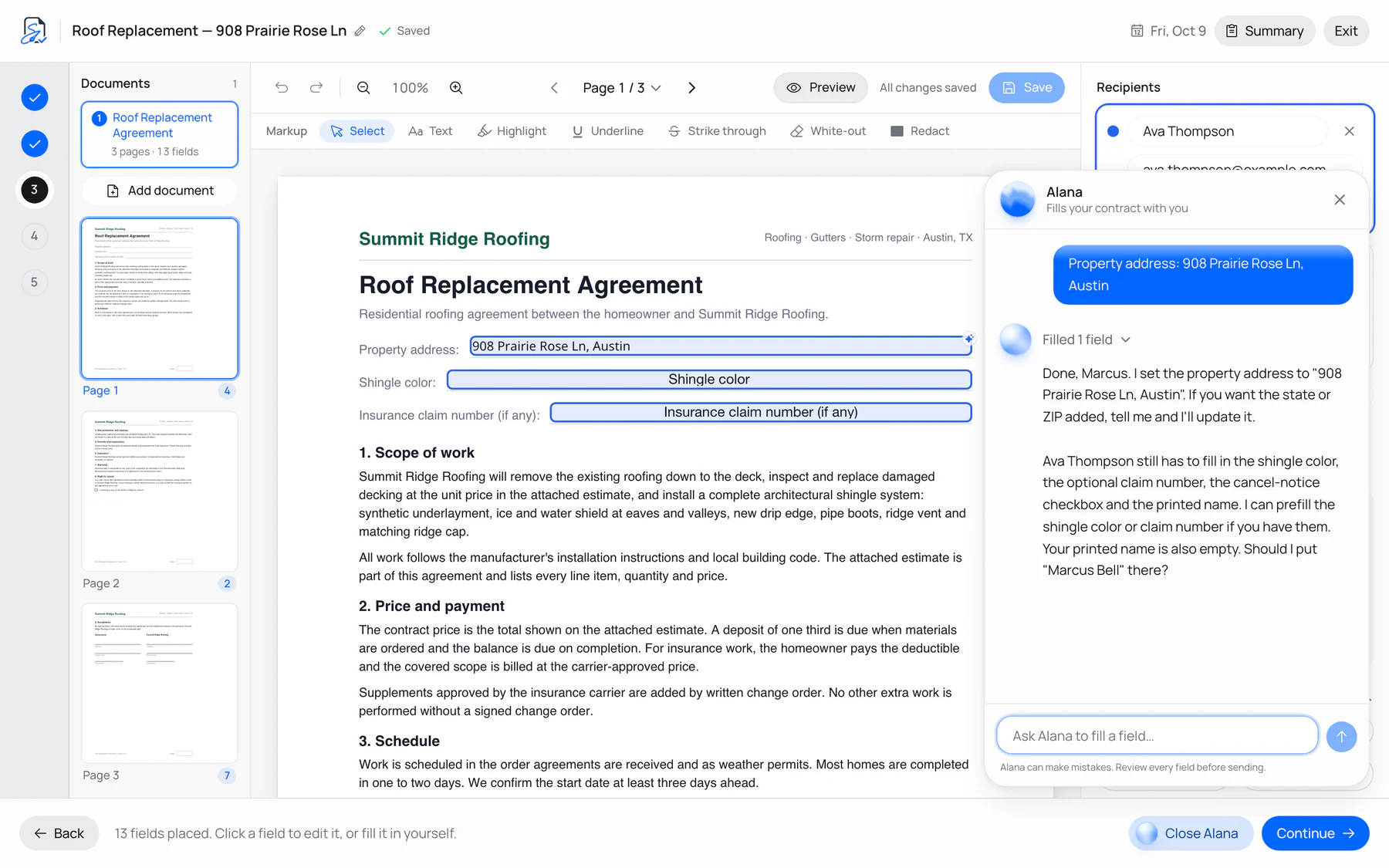
 Alana · SignMasterFills contracts from a short chat
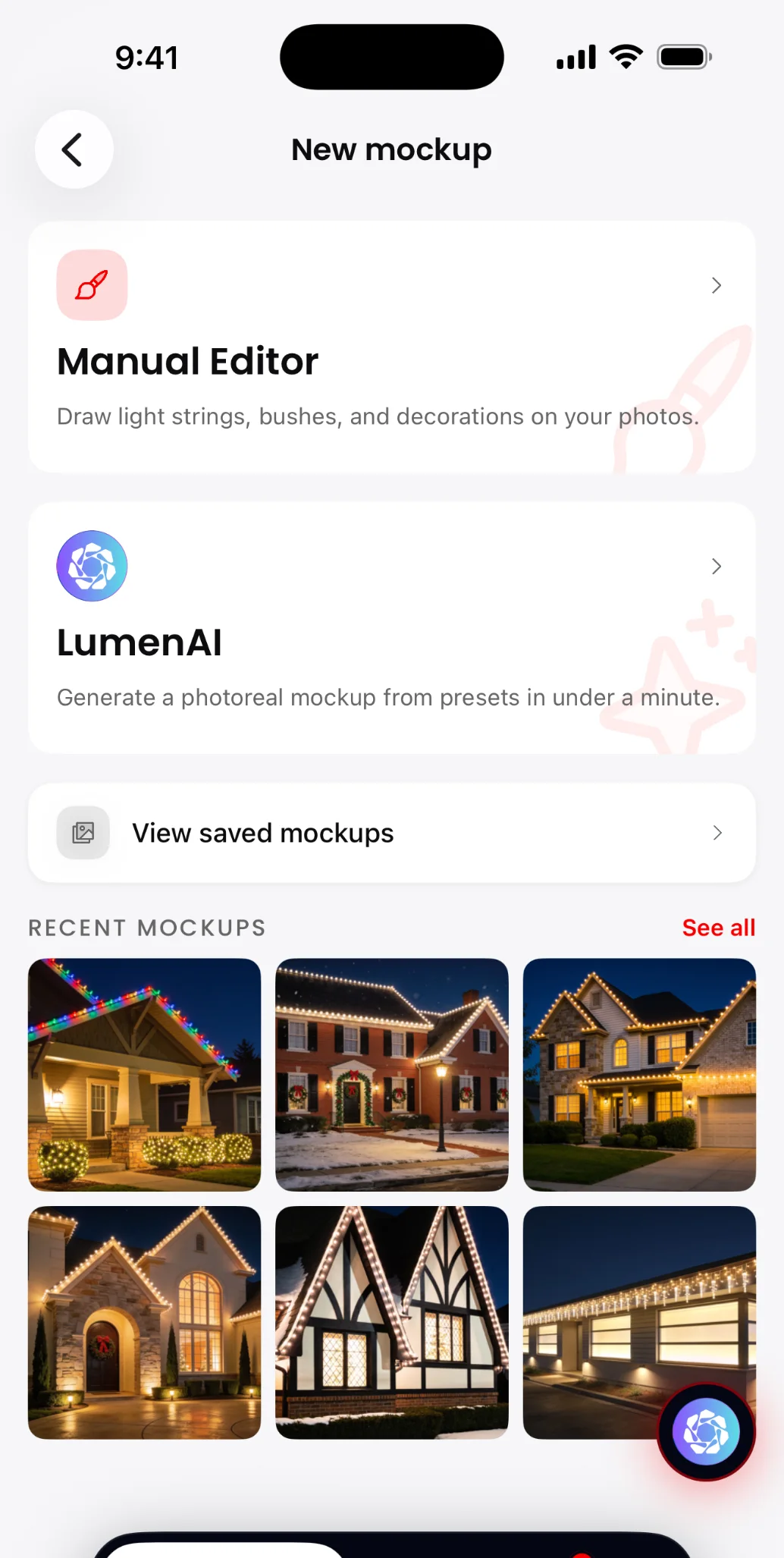
 LumenAI · LightMasterPhoto-real lighting mockups
What we can build
Four kinds of AI.Twelve places to start.
Most AI features do one of four jobs. They talk to customers, work inside your app, create things or make sense of information.
Website chatbots
A chat on your site that answers from your own pages, policies and FAQs at any hour, and sends warm leads to your inbox.
Customer support agents
Answers questions, looks up orders and accounts, and hands the chat to a person when it should, with the history attached.
Voice agents
Picks up the phone, answers common questions, books appointments into your calendar and takes messages.
In-app assistants
An assistant that does the work for your users. SignMaster's Alana fills in contracts from a short chat.
Workflow agents
Agents that update records, send follow-ups or create invoices, and ask a person to approve before anything happens.
Claude and ChatGPT connectors
Let your customers use your app from inside Claude or ChatGPT. SignMaster has one.
Image and rendering tools
Turn a photo into a finished design. LightMaster's LumenAI makes photo-real lighting mockups of a customer's house.
Content with a human check
Drafts of blog posts, product descriptions and emails in your voice, reviewed by a person before anything goes out.
Coaching and recommendations
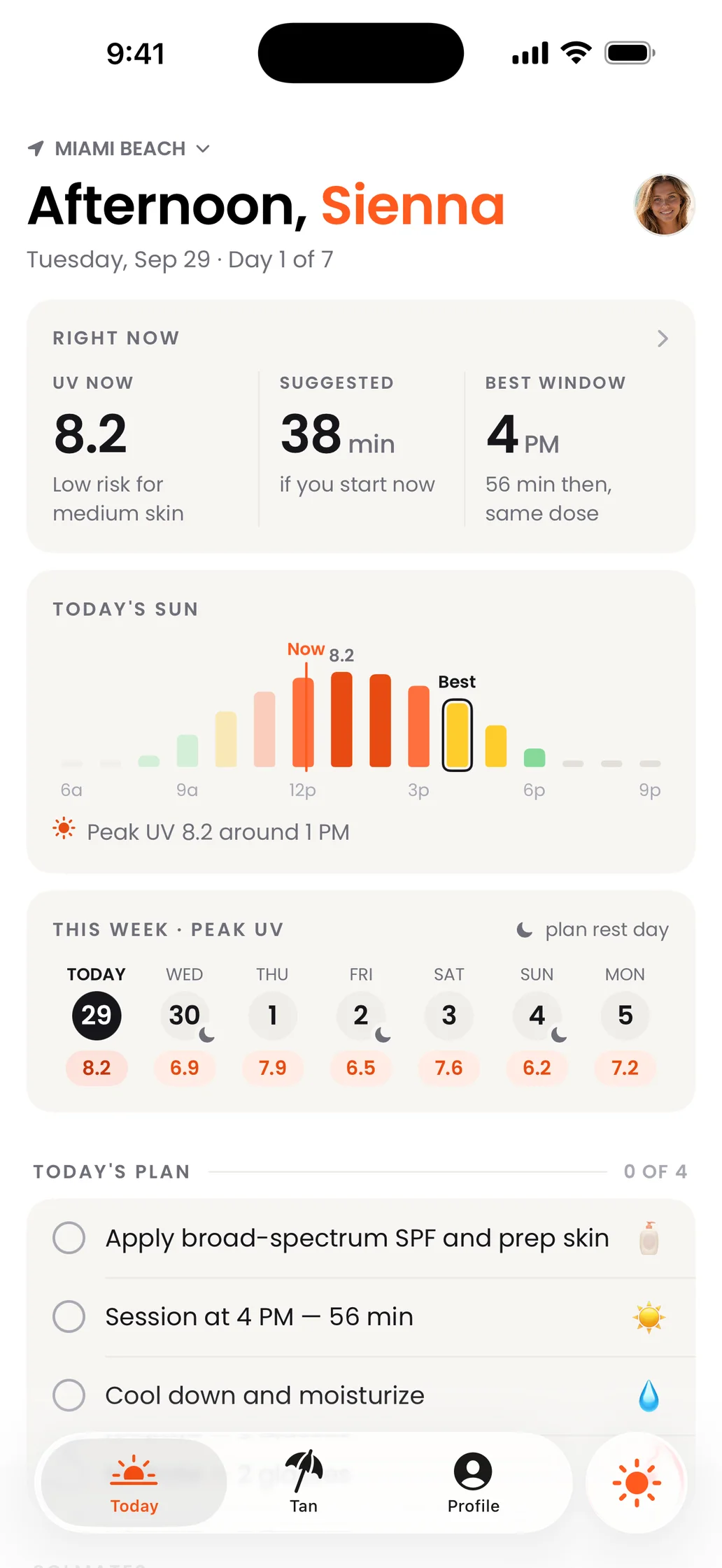
Personal suggestions based on what each user is doing. Solmate pairs an AI coach with live UV guidance.
Document AI
Reads PDFs, scans and forms, pulls out the data you need and puts it where it belongs.
Search over your data
Ask a question in plain English and get an answer from your own documents, tickets or database, with links to the source.
Call and meeting summaries
Turns calls and meetings into summaries, action items and follow-ups, and spots patterns across them.
Example support agent
Answers in seconds.Knows when to stop.
Here's the kind of agent we build. It answers from your information, checks your systems, and passes the chat to a person when a request needs one.
Answers from your own content.
It learns from your help pages, policies and past tickets, and says so when it doesn't know.
Looks things up for real.
Orders, bookings and accounts come straight from the systems you already use.
Hands off cleanly.
A team member picks up with a summary attached, so the customer never repeats themselves.
Hi! My order hasn't shown up yet. It's #10482.
- Looked up order #10482
Thanks. Order #10482 shipped Tuesday and is out for delivery today, between 2 and 6 PM.
Can it go to my office instead? I won't be home.
Changing the address on a shipped order needs a person, so I'm passing you to our team with your order details. You won't need to repeat anything.
- Handed to a team memberSummary sent with the chat. Order #10482 is out for delivery today. The customer wants it sent to their office.
- Sam · Support team
Hi, Sam here. I can reroute that for you. What's the office address?
Example conversation. The customer, order and team member are fictional.
Shipped in our own products
Three AI features.Already shipped.
We built AI into our own products before offering it to anyone else. Here are three of those features, each shown on its real screen.
 SignMasterAlana, the AI assistant
Alana fills the contract.
SignMaster's assistant fills in contract fields from a short chat and asks when it isn't sure. People review every field before anything is sent.
- In-app assistant
- Web app
 LightMasterLumenAI
LumenAI lights the house.
LightMaster's LumenAI turns a photo of a customer's house into a photo-real holiday lighting mockup, so the job sells before the ladder comes out.
- Image generation
- On iPhone
 SolmateAI coach
A coach in the sun.
Solmate, our outdoor tanning companion, pairs an AI coach with live UV guidance and session timers in a native iPhone app.
- AI coaching
- Native iPhone app
How we build it
From idea totrusted feature.
Five steps, the same for a simple chatbot or a multi-step agent.
- 01
Pick the job.
We find the task that costs your team or your customers the most time, and check that AI is the right tool for it.
- 02
Ground it in your data.
We connect the model to your documents, database and tools, so its answers come from your business.
- 03
Test with real questions.
A working version runs against real questions and edge cases from your business before anyone relies on it.
- 04
Launch with guardrails.
Limits on what it can say and do, a person approving anything important, and an easy way to reach a human.
- 05
Watch and improve.
We monitor answers and costs after launch, and tune prompts, data and models as they get better.
How we build AI responsibly
A person staysin charge.
AI is fast and confident, and sometimes wrong. We build every feature so the people who know your business keep the final say.
A person approves actions.
Agents can look things up, draft and suggest on their own. Refunds, emails, record changes and anything else that matters wait for a yes from your team.
Your data stays yours.
It stays in accounts you own, and each request sends the model only what that task needs.
Tested against real questions.
Before launch we run it against real questions from your business, awkward ones included, and fix what it gets wrong.
Costs watched from day one.
Usage limits, alerts and the smallest model that does the job well, so the bill stays in line with the value.
OpenAI or Claude.
We build with both, pick per feature for quality, speed and cost, and keep the model swappable as they improve.
Change the delivery address
- Order
- #10482
- From
- 18 Elm St (home)
- To
- 400 Commerce Dr, Suite 210
- Why
- Customer asked in chat
Nothing changes until your team says yes.
Activity log
- Agent · Looked up order #104822:14 PM
- Agent · Asked to reroute it2:15 PM
- Sam · Approved the change2:16 PM
Questions? Answers.
Which AI models do you use?
We build with OpenAI and Claude and choose per feature, based on answer quality, speed and cost. We keep the model swappable, so your feature can move to a better or cheaper one later.
Will it make things up?
Any AI model can get things wrong, so we design for it. We ground answers in your own data, set guardrails for what it can say and do, and keep a person in the loop for anything important. Before launch we test it against real questions from your business.
What happens to our data?
It stays in accounts you own. Each request sends the model only what that task needs, through the providers' business APIs with settings that keep your data out of model training. Before launch we walk you through exactly what gets sent.
What does it cost to run?
AI providers charge by usage, so the cost depends on how much the feature is used and which model it runs on. We estimate it before we build, use the smallest model that does the job well, and set limits and alerts so the bill never surprises you.
Can it plug into my existing software?
Usually, yes. If your software has an API or a database we can reach, the AI can read from it and, with your approval, act in it. We've built AI into our own e-signature app and our own CRM.
How long does it take?
A focused feature, like a chatbot that answers from your help pages, is a small project. An agent that takes actions across several systems takes longer, because it needs more testing. Your written plan has the timeline.
What should AI do for you?
Tell us the task you'd like off your plate. A team member will respond within 24 hours.